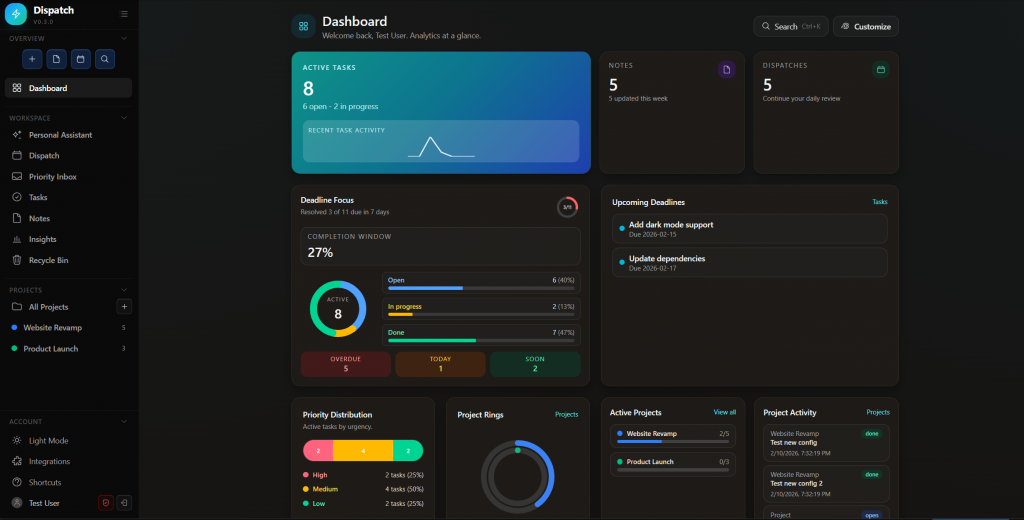
Dispatch is a self-hosted workspace that brings everything together in one fast interface, with control over your data and a workflow that is designed for execution.
Why Dispatch Exists
Most productivity tools are either too lightweight to handle real planning or too complex for day-to-day use.
Dispatch aims for the middle:
- Local-first storage with SQLite on your machine
- A modern web app experience with keyboard-first speed
- Connected workflows across tasks, projects, notes, and daily planning
- Optional AI assistance that can take actions inside the app
An Agentic Engineering Experiment
Dispatch was an opportunity for me to see how far I could push agentic engineering. In today’s world with the emergence of AI I wanted to do something similar to OpenAI’s harness engineering experiment. I started this project prior to the post coming out, but I was shocked to see some similarities in approach. I found a few keys helped make this possible…
I’ve collected and compiled those thoughts into a unified post here:
The New Work Frontier: How Agentic Engineering Is Reshaping Modern Work
What You Can Do in Dispatch
- Track tasks with status, priority, due dates, and project links
- Plan work in projects with progress rollups
- Write notes in Markdown with editing and preview support
- Run a daily dispatch workflow for planning and carryover
- Search globally across tasks, notes, and dispatch records
- Restore deleted items from a recycle bin when needed
- Sign in with GitHub OAuth or local credentials
Dispatch also includes a Personal Assistant (Beta) powered by the Vercel AI SDK and a local MCP tool server, so the assistant can do real work in your workspace, not just chat.
Built for Local Control
Dispatch runs on a Next.js + Node runtime and stores data in a local SQLite database file (or Docker volume when containerized). Your browser is the client, and your data remains under your control.
If you want a personal productivity system without handing your workflow to a third-party cloud, this is the core idea.
Tech Stack
- Next.js 16
- React 19
- TypeScript 5
- Tailwind CSS v4
- SQLite
- Drizzle ORM
- NextAuth.js v5
Quick Start
The fastest way to run Dispatch is Docker:
.\dispatch.ps1 setup
Then open http://localhost:3000.
For local Node.js development:
npm install
npm run db:migrate
npm run dev
Try Dispatch
Repository: https://github.com/nkasco/DispatchTodoApp
If you want a private, fast, and extensible system for personal execution, Dispatch is ready to run on your machine today.